🚚 Free Worldwide Shipping on All Orders!Shop Now
Key Fob for Capristo Remote
To Add a New Key Fob to the Capristo Programmable CES3 Module:
- Shortly hold the magnet on the blue dot‘s position. The RC light keeps on illuminating. Press briefly button 1 on the key fob. The RC light goes dark. Press button 1 again. The RC light flashes until the new key fob has been stored. The key fob is now ready for use.
- Put the magnet on the hidden magnetic switch 2 (the glowing diode shows its standby). Push button 1 of the remote control (the diode goes dark and the controller receives the remote control). Push button 1 of the remote control for one second (the diode starts flashing, afterwards it goes dark and the key fob is trained). A maximum of 10 remote controls can be trained to one control unit. All trained remote controls can be erased by putting the magnet for at least 10 seconds on the magnetic switch (after the removal the diode confirms by flashing). For repeated training, please just repeat the training procedure
Product Information
Product Information
Shipping & Returns
Shipping & Returns
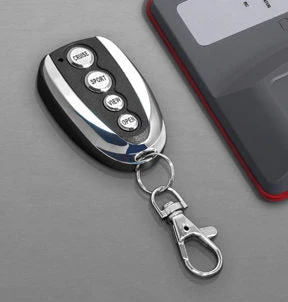
Key Fob for Capristo Remote
Key Fob for Capristo Remote
To Add a New Key Fob to the Capristo Programmable CES3 Module:
- Shortly hold the magnet on the blue dot‘s position. The RC light keeps on illuminating. Press briefly button 1 on the key fob. The RC light goes dark. Press button 1 again. The RC light flashes until the new key fob has been stored. The key fob is now ready for use.
- Put the magnet on the hidden magnetic switch 2 (the glowing diode shows its standby). Push button 1 of the remote control (the diode goes dark and the controller receives the remote control). Push button 1 of the remote control for one second (the diode starts flashing, afterwards it goes dark and the key fob is trained). A maximum of 10 remote controls can be trained to one control unit. All trained remote controls can be erased by putting the magnet for at least 10 seconds on the magnetic switch (after the removal the diode confirms by flashing). For repeated training, please just repeat the training procedure
$41,797.30
Key Fob for Capristo Remote—
$41,797.30
Product Information
Product Information
Shipping & Returns
Shipping & Returns
Description
To Add a New Key Fob to the Capristo Programmable CES3 Module:
- Shortly hold the magnet on the blue dot‘s position. The RC light keeps on illuminating. Press briefly button 1 on the key fob. The RC light goes dark. Press button 1 again. The RC light flashes until the new key fob has been stored. The key fob is now ready for use.
- Put the magnet on the hidden magnetic switch 2 (the glowing diode shows its standby). Push button 1 of the remote control (the diode goes dark and the controller receives the remote control). Push button 1 of the remote control for one second (the diode starts flashing, afterwards it goes dark and the key fob is trained). A maximum of 10 remote controls can be trained to one control unit. All trained remote controls can be erased by putting the magnet for at least 10 seconds on the magnetic switch (after the removal the diode confirms by flashing). For repeated training, please just repeat the training procedure